Non-Group Merging
Merge with no special grouping rules
For this Section Merge method, the system automatically tries to merge all Sections in the Network using your configured rules. No grouping file is required. If any Sections can't be merged, they are included as individual Super-Sections.
Merge rules
Two Sections are only merged if they pass the following rules.
| Rule | Description |
|---|---|
| Max. Gap Between Sections | Their closest endpoints are within the configured maximum distance |
| Max. Angle Between Sections | The angle of deviation at the join is below the configured maximum. Sections are perfectly aligned at 0 degrees |
| Direction match (optional) | Both Sections flow in the same direction when joined |
Where more than one Section is a candidate for joining (e.g. at a fork), the pair with the smallest endpoint distance and angle of deviation is chosen.
Sections are merged until the longest possible Super-Section is formed.
Set up a Non-Group Merge
-
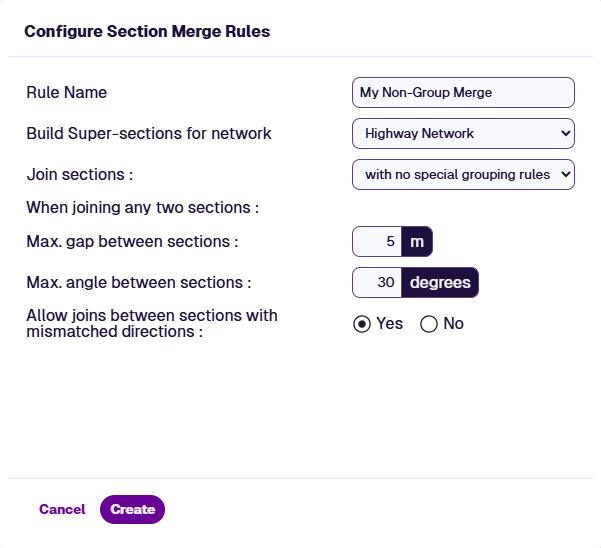
In the Management toolbar, select Section Merge and then Add Section Merge Rules.
-
Configure these general settings:
-
Rule Name - enter a descriptive name for the new Super-Section Layer.
-
Build Super-sections for network - choose the Network Layer you want to merge.
-
Join sections - with no special grouping rules.
-
-
Configure these Non-Group settings:
-
Max. gap between sections - maximum endpoint distance for two Sections to be considered for merging. Set between
1and500metres. Keep this small to avoid unintended merges. -
Max. angle between sections - maximum alignment angle at the join. Set to
180degrees to disable this rule. Angle of deviation is used as the tie-breaker when multiple candidates exist. -
Allow joins between sections with mismatched directions - if enabled, merge Sections regardless of direction (end-to-end / start-to-start joins). If disabled, only merge Sections with the same direction (start-to-end / end-to-start joins).
-
-
Select Create. When the merge has completed, the new Super-Section Layer can be used in Explorer and Analysis.