Hybrid Merging
Merge within and around groups
This Section Merge method combines the other two:
-
Group pass - Sections with a Group ID are merged using the Group rules.
-
Non-Group pass - Sections with no Group ID, or those unmatched in the Group pass, are merged using the Non-Group rules.
Use this method when automatic merging works for most Sections but you need manual control over some.
For example, you could supply a grouping file for Sections at forks, where automatic matching may produce unwanted merges. Let the Non-Group pass handle everything else.
Set up a Hybrid Merge
-
Import your grouping file to generate a grouping Layer.
-
In the Management toolbar, select Section Merge and then Add Section Merge Rules.
-
Configure these general settings:
-
Rule Name - enter a descriptive name for the new Super-Section Layer.
-
Build Super-sections for network - choose the Network Layer you want to merge.
-
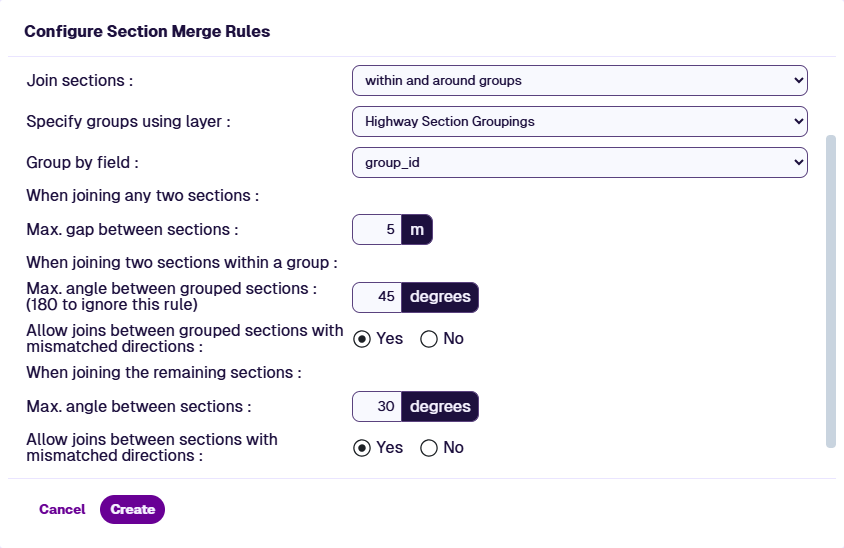
Join sections - within and around groups.
-
-
Configure this shared setting:
- Max. gap between sections - maximum endpoint distance for two Sections to be considered for merging. Set between
1and500metres. Keep this small to avoid unintended merges.
- Max. gap between sections - maximum endpoint distance for two Sections to be considered for merging. Set between
-
Configure these Group settings:
-
Specify groups using layer - select the Layer generated by your grouping file import in step 1.
-
Group by field - select the field containing the Group ID.
-
Max. angle between grouped sections - applies to Sections with the same Group ID. Maximum alignment angle at the join. Set to
180degrees to disable. Angle of deviation is used as the tie-breaker when multiple candidates exist. -
Allow joins between grouped sections with mismatched directions - applies to Sections with the same Group ID. If enabled, merge Sections regardless of direction (end-to-end / start-to-start joins). If disabled, only merge Sections with the same direction (start-to-end / end-to-start joins).
-
-
Configure these Non-Group settings:
-
Max. angle between sections - applies to Sections with different Group IDs or none. Set to
180degrees to disable this rule. Angle of deviation is used as the tie-breaker when multiple candidates exist. -
Allow joins between sections with mismatched directions - applies to Sections with different Group IDs or none. If enabled, merge Sections regardless of direction (end-to-end / start-to-start joins). If disabled, only merge Sections with the same direction (start-to-end / end-to-start joins).
-
-
Select Create. When the merge has completed, the new Super-Section Layer can be used in Explorer and Analysis.