Data Import
Bring external data into Asset Strategy
The Data Import tool lets you import GIS or CSV datasets against your Network, e.g. survey data, inspection reports, accident data, inventory records.
Each data item in your file is matched to a Section, giving it a location on the map. Files without geometry must include Section references, with optional chainages to pinpoint each item's location along a Section. Files with geometry can be matched spatially to Sections using coordinates instead of references.
Once processed, your data is available as a Layer in Explorer. Where configured, numeric data fields can also be used for Graphing and as Condition Parameters in Analysis.
This system is cleared for data up to Business Impact Level 1 (BIL1) only. Refer to your data policy before uploading.
Manage imports
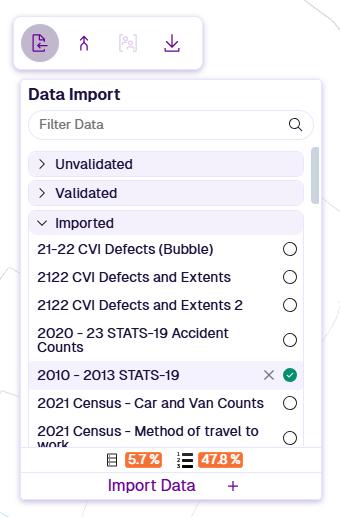
In the Management toolbar, select Data Import to show existing imports, grouped by status. Select one to open its configuration.
The bottom percentages indicate your company storage usage (hover icons for details). Default limits are 2,000 MB and 1,000,000 data items. To request higher limits, please contact Causeway Support.
To delete an import, hover over it and select Delete.
If a committed import is deleted, its data source and any corresponding Layers are also deleted.
Import data
To perform a new import:
-
Upload files - prepare and upload GIS or CSV files.
-
Configure fields - describe your import data fields. Save the configuration as a template.
-
Configure data import - determine how data items are matched to Sections.
-
Validate and process - validate the import settings against the data, then commit the import.
Ownership and sharing
Any user with Management access can view data import configurations.
When you process and commit an import, a data source and default Layer are created. Both are accessible to all users.
If User Groups are enabled, both are initially private to you (and administrators). You can share the Layer with specific User Groups. This also shares the underlying data source, so other users can graph and export the data as needed.