Strategies
Set targets for Works Plans
A Strategy is a target or constraint that can be defined for multiple financial years.
You can add multiple Strategies to a Works Plan. When the Works Plan runs, it will focus on selecting potential Treatment schemes that meet all the added Strategies. While this isn't guaranteed, the Works Plan will always determine the most affordable outcome that meets the most Strategies. To learn more, see Create a Works Plan.
This makes it possible to steer a Works Plan towards a set of requirements or service levels.
Types
There are several types of Strategy:
-
Network - define target values for Network-level condition monitors. Available monitors vary depending on your company project. Each monitor represents an industry standard or common statistic for classifying road and footway conditions. Useful for meeting key performance indicators (KPI).
UK examples
Current Standards & Reporting (England)
-
PAS 2161: The Publicly Available Specification, introduced by the BSI in 2024. It transitions England's road reporting from a single mandated technology (SCANNER) to a technology-neutral framework, allowing AI and other approved methods:
- Grade 1 (No deterioration): The pavement is in excellent condition and requires no maintenance.
- Grade 2 (Minor): Slight wear is present, typically requiring light maintenance such as minor patching.
- Grade 3 (Moderate): Mid-life preventative maintenance is needed, such as surface dressing or crack sealing.
- Grade 4 (Moderate to Severe): Rehabilitative maintenance is required, likely across the full width of the carriageway.
- Grade 5 (Severe): The road requires substantial structural maintenance, such as full resurfacing or total reconstruction.
-
130-01 and 130-02: Items on the Ministry of Housing, Communities and Local Government (MHCLG) Single Data List.
- 130-01: Percentage of principal (A) roads where maintenance should be considered.
- 130-02: Percentage of non-principal classified (B and C) roads where maintenance should be considered.
-
RCI (Road Condition Indicator): A numerical score derived from SCANNER data used to categorise road health. Used as the basis for several other standards:
- Green (<40): Good condition.
- Amber (40-100): Maintenance should be investigated.
- Red (>100): Maintenance should be considered.
Legacy Performance Indicators (England)
-
BVPI (Best Value Performance Indicators): Replaced by the National Indicator (NI) set in 2008 and later by the Single Data List. Still used internally by some local authorities:
-
BVPI 224b: Percentage of unclassified road network where maintenance should be considered. Typically based on Coarse Visual Inspections (CVI).
-
BVPI 187: Percentage of high-usage footway routes (Categories 1 and 2) where maintenance should be considered. Typically based on Detailed Visual Inspections (DVI).
-
Regional Frameworks (Wales & Scotland)
-
PAM (Public Accountability Measures): The standard road condition assessment framework used in Wales. It provides a consistent overview of the local road network's state by combining machine-based surveys with visual inspections.
- PAM/020: Percentage of Principal (A) Roads in the red RCI band.
- PAM/021: Percentage of Non-principal (B) Roads in the red RCI band.
- PAM/022: Percentage of Non-principal (C) Roads in the red RCI band.
-
SRMCS (Scottish Road Maintenance Condition Survey): The annual automated survey of all local authority roads in Scotland. It reports the percentage of the network in the red/amber RCI bands.
-
-
Local - define target values for local Condition Parameters. These are monitored on individual asset subsections and intelligently deteriorated/improved during each year of a Works Plan. Set a Minimum, Maximum or Mean target as needed. Useful for defining minimum service levels.
-
Backlog - define the maximum cost of each year's Maintenance Backlog. This represents the total cost of all potential Treatment schemes that are deferred by a Works Plan for that financial year. Useful for limiting the accumulation of outstanding work. Cannot be used with Emissions Strategies or Sub-budgets.
-
Emissions - define the maximum total volume of gases emitted by performing Treatments each year. Useful for limiting environmental impact and complying with regulations. Cannot be used with Backlog Strategies.
To set the costs and emissions of a Treatment, see Costing in Create a Treatment.
Manage Strategies
In the Analysis toolbar, select Strategies to show existing Strategies, grouped by type. Open a folder to list the Strategies inside. Select one to open its configuration.
To perform an action, hover over a Strategy and select Options:
-
Rename - give the Strategy a new name.
-
Clone - configure a new copy of the Strategy.
-
Delete - permanently delete the Strategy.
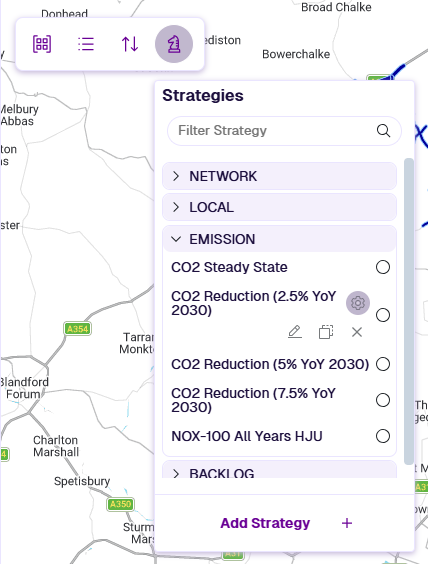
Add Strategy
To define a new Strategy:
-
In the Analysis toolbar, select Strategies and then Add Strategy.
-
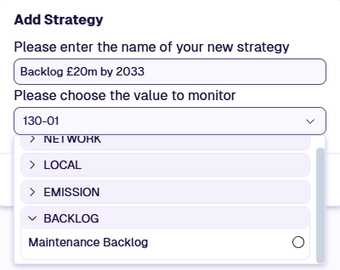
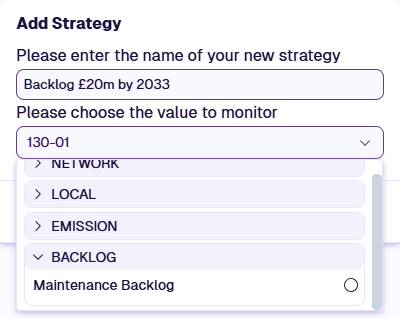
Enter a descriptive name for the new Strategy. In the monitor dropdown, choose the new Strategy type, then select an available monitor in the list. Select OK.
-
In the Strategy Editor, select Add Target. Select one or more financial years, then select OK.
-
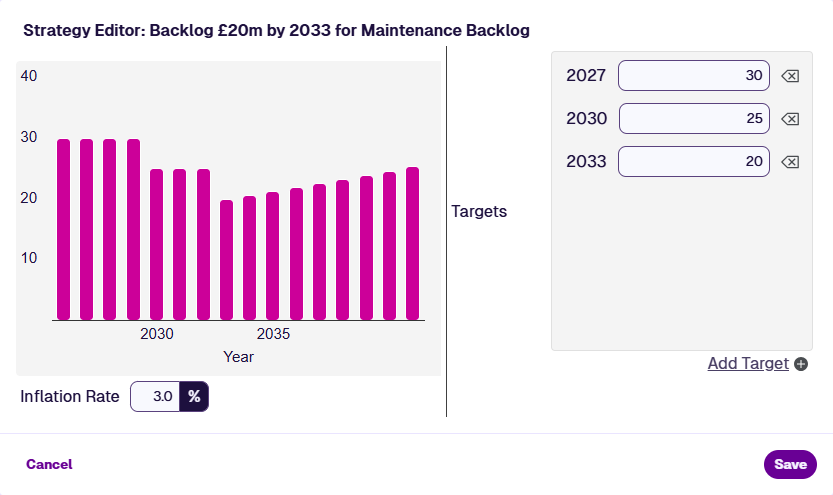
Enter a target value for each financial year. The graph updates automatically to visualise the target trend over time. If a target value isn't entered for a year, it remains the same as the previous year. Preceding years use the first target entered. In Backlog Strategies, for the years following the last entered target, inflationary rises are calculated at the specified rate.
Example details
Financial Year Target (£m) Source 2026 30 Automatic 2027 30 Added 2028 30 Automatic 2029 30 Automatic 2030 25 Added 2031 25 Automatic 2032 25 Automatic 2033 20 Added 2034 20.6 Inflation rate = 3% 2035 ... 21.2 Inflation rate = 3% 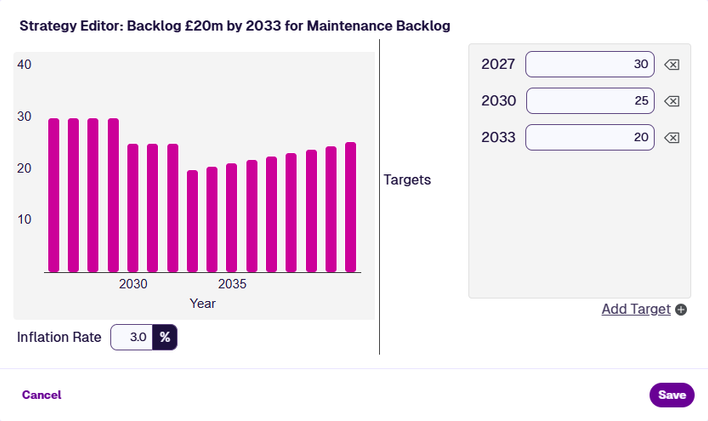
Use in Works Plans
When creating a Works Plan, enable Include Performance Strategies in the 2 Scenario types section and add one or more Strategies from the picker. Note the compatibility restrictions between the types described above. This is optional.
Once the Works Plan has run, the Works Plan Summary Report lists the included scenarios and shows whether all Strategy targets were met. Select a scenario to open its detailed report, which breaks down costs, conditions and Treatment selections for each financial year.